






WeeeCore AIOT Handle – AI x IoT Education Kit | SR-181061
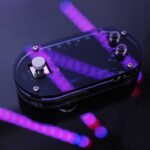
Weeemake has developed WeeeCore, an AI x IoT education robot controller that is perfect for various teaching scenarios, including school classroom teaching, community teaching, and online/offline training for STEAM, coding, robotics, AI, IoT education, and more. The game-pad structure and rich onboard electronics make WeeeCore highly versatile and useful.
WeeeCore boasts a built-in offline voice recognition module and colorful LED display, creating engaging and attractive human-machine interaction. It also features multiple onboard sensors, including a light sensor and gyroscope, that provide diverse data outputs.
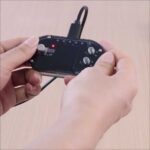
Additionally, WeeeCore has two extension ports that enable you to connect to an extension chassis board and open-source electronic modules. A Type C port allows for power supply and communication with PCs. Five LEDs provide abundant light effects, and a colorful LCD display, onboard microphone, and speaker facilitate audio-video interaction in STEAM education.
WeeeCode programming software supports graphical programming and Python programming, making it accessible to users of all ages, from beginners to professional developers.


| Lesson | Lesson Name | Content | Point of knowledge |
| Lesson 1 | Underwater Lab – Movement | Planning the motion path of a submarine | Learn about programming interfaces. Learn about motion-related code, learn to move and turn. |
| Lesson 2 | Underwater Lab – Loop | Using a repeat optimization program to make the motion smoother | Learn to break down motion, understand dynamic effects. |
| Lesson 3 | Submarine Pilot | Designing an intelligent controller for submarine motion | Learn about hardware connections for controllers, understand synchronous and asynchronous commands |
| Lesson 4 | Transforming Rumble Elephant | Using voice commands to activate a transformation mode, allowing the submarine to imitate a swordfish and navigate dangerous waters | Understand character size and shape, the concept of canvas center |
| Lesson 5 | Crossing Underwater Currents | The character Rumble is swept away by a vortex and ends up in the lost city of Atlantis | Understand character special effects, repeated execution, rate of change, and amount of change. |
| Lesson 6 | Underwater Adventure | Designing button controls with conditional statements to help the submarine evade mechanical robot monsters | Understand the stage size and control the role movement through coordinates |
| Lesson 7 | Activating Defense System | Creating a graphic representation of the defense system | Master the method and techniques of drawing polygons. |
| Lesson 8 | Magic of the Robot Beast | Designing spatial and fire-based magic for the mechanical robot monsters to destroy the defense system | Use stamping to design motion trails. |
| Lesson 9 | Atlantis Expedition (Part 1) | Completing a task in which Rumble uses the Zeus shield and Poseidon’s trident to eliminate fireballs and drive away the mechanical monsters in Atlantis | Learn about code detection, logical operations and “and” and “or”. |
| Lesson 10 | Atlantis Expedition (Part 2) | ||
| Lesson 11 | Artifact Charging | Collecting randomly appearing energy minerals to charge the artifact | Use variables to keep score. |
| Lesson 12 | Artifact Charging | Designing sensors that allow the submarine to automatically navigate through underwater canyons | Learn program optimization methods. |
| Lesson 13 | Underwater Biological Sampling (Part 1) | Designing a program for Rumble and other underwater characters to collect sea creatures using a spear, starting from the submarine | Use all learned knowledge together to optimize programs. |
| Lesson 14 | Underwater Biological Sampling (Part 2) | ||
| Lesson 15 | Underwater Palace (Part 1) | Creating basic controls for Rumble and designing the fireball trajectory while designing victory and defeat mechanisms for the underwater palace challenge | Use all previous knowledge to create rich game design. |
| Lesson 16 | Underwater Palace (Part 2) | Designing multi-layered maze switching and trap designs to make the game more diverse | |
| Lesson | Lesson Name | Content | Point of knowledge |
| Lesson 1 | Space Travel | Designing the orbit of rockets and satellites | Use all previous knowledge to create rich game design. |
| Lesson 2 | The Eight Planets of the Solar System | Designing models for the orbits of the eight planets around the sun and their revolution cycles | Design programs for circular motion and understand astronomical knowledge related to the solar system. |
| Lesson 3 | Our Earth | Learn about hardware connections for controllers, understand synchronous and asynchronous commands. | |
| Lesson 4 | Tidal Locking | Designing a model for the tidal gravity of the Earth-moon system, explaining the phenomenon of tides | Create a screen that does not refresh when building blocks are used, and learn about tidal astronomy. |
| Lesson 5 | Through the Wormhole | Creating a small animation of Rumble discovering and traveling through a wormhole | Design spiral motion programs, understand the concepts of rate and amount of change, and apply sound materials. |
| Lesson 6 | Alien Baby (Part 1) | Designing a game where Rumble pilots a spaceship to rescue alien babies hiding in a small asteroid belt while avoiding random meteorites | Use random numbers, program for multiple characters, and use color pickers. |
| Lesson 7 | Alien Baby (Part 2) | ||
| Lesson 8 | Interstellar Communication | Designing a dialogue system between Rumble and the alien babies to learn about their home planet | Understand the concept of strings, use human-computer interaction to ask questions through code, and allow characters to interact with each other through broadcasts. |
| Lesson 9 | Alien Store (Part 1) | Calculating the cost of purchasing supplies and refueling the spaceship | Use strings, operations, and comparisons. |
| Lesson 10 | Alien Store (Part 2) | ||
| Lesson 11 | Alien Monster (Part 1) | Designing a program for the alien monsters to roam and attack, accompanied by good sound effects and visual effects | Use motion-related code, random numbers, detection-related code, and sound materials together. |
| Lesson 12 | Alien Monster (Part 2) | Designing a program for Rumble’s spaceship control system, including an electromagnetic shield and weapons to battle the alien monsters | Use motion-related code, detection-related code, and sound/material design effects together. |
| Lesson 13 | Time Accelerator (Part 1) | Escorting the alien babies back to their planet, Miller, near the large black hole, Kugantuya | Use timers and all previous knowledge together. |
| Lesson 14 | Time Accelerator (Part 2) | While only a short time has passed on Miller, Earth has undergone several years of seasonal changes, which are designed and displayed on the screen | |
| Lesson 15 | Clock on the Spaceship (Part 1) | Designing an intelligent clock and alarm clock display on the screen | Time conversion algorithms for hours, minutes, and seconds. |
| Lesson 16 | Clock on the Spaceship (Part 2) | Design alarms based on time variables. |

| Name | WeeeCore | |
| Chip | ESP-WROOM-32 | |
| Processor | Main processor | ESP32-D0WDQ6 |
| Clock frequency | 80~240 MHz | |
| Onboard memory | ROM | 448 KB |
| SRAM | 520 KB | |
| Extended memory | SPI Flash | 4 MB |
| Working Voltage | DC 5V | |
| Operating system | micropython | |
| Wireless communication | Wi-Fi | |
| Dual-mode Bluetooth | ||
| Physical ports | Micro USB port (Type-C) | |
| Extension Connecting Port x 2 | ||
| Power Port (PH2.0) | ||
| Onboard Electronics | RGB LED x 5 | |
| Light Sensor x1 | ||
| Microphone x1 | ||
| Speaker x1 | ||
| Gyroscope Sensor x1 | ||
| 1.3′ TFT LCD Color Display x1 | ||
| Joystick (5 direction) x1 | ||
| Button x2 | ||
| Offline Speech Recognition Module x1 | ||
| Hardware version | V1.0 | |
| Dimensions | 86 mm × 44 mm × 22 mm (height × width × depth) | |
| Weight | 41 g | |

| Name | WeeeCore Expansion Board |
| Working Voltage | 4.5V (3AA Batteries) |
| Physical ports | WeeeCore Connection Port X2 |
| Power Port (PH2.0) | |
| Ultrasonic Port | |
| 3Pin Port x 4 (support servo, open-source electronics) | |
| I2C Port x 2 | |
| Encoder Motor ZH1.5 6PIN x 4 | |
| Motor & Wheels | Encoder Motor x2 |
| Wheel x2 | |
| Caster Wheel x1 | |
| Electronics | Line Follower Sensor x4 |
| Ultrasonic Sensor x1 | |
| Battery Holder x1/Lithium Battery Pack x1 (optional) | |
| Hardware version | V1.0 |
| Dimensions | 117 mm × 90 mm × 33mm (height × width × depth) |
| Weight | 115 g |

Applications of WeeeCore:
- School classroom teaching for STEAM, coding, robotics, AI, and IoT education
- Community teaching for technology and innovation education
- Online/offline training for STEAM, coding, robotics, AI, and IoT education
- DIY projects for makers and enthusiasts
Fun projects for AI x IoT education:
- Creating a voice-controlled robot that responds to verbal commands
- Building a line-following robot using the onboard sensors
- Designing a smart home automation system using the extension ports and sensors
- Creating a game using the LED display and WeeeCode programming software
- Building a drone that can be controlled using the game-pad structure and onboard electronics
- Creating an interactive art installation using the colorful LED display and audio-video interaction features
- Designing a smart garden irrigation system using the light sensor and WeeeCode programming software
- Creating a motion-controlled musical instrument using the gyroscope and microphone
- Building a weather monitoring station using the onboard sensors and LCD display




Reviews
There are no reviews yet.