






WeeeCore Bot AIOT Voice Programming Robot | SR-181066
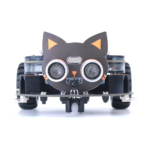
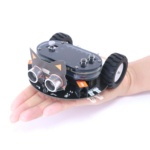
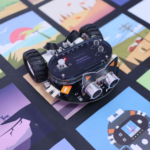
Unlock the world of interactive learning with WeeeCore Bot, an innovative AI voice coding IoT drawing robot designed to inspire and educate.
Perfect for learners of all ages, WeeeCore Bot combines fun with education, paving the way for a future where technology and learning go hand in hand.
WeeeCore Bot: A Versatile Tool for Learners of All Levels
AI Voice Coding IoT Drawing STEAM Robot
Welcome to the WeeeCore Bot, an advanced educational robot perfect for users from kindergarten to advanced learners. It’s a gateway to mastering technology through hands-on experience.
Why Everyone is Talking About the WeeeCore Bot:
- Versatile Learning: From voice coding and drawing for early learners to Scratch 3.0 and microPython for advanced users.
- Rich Features: Equipped with sensors, WiFi, and expandable options, it’s an ideal tool for both education and robotics enthusiasts.
- A New Approach to STEAM: Making complex concepts accessible and enjoyable for everyone.

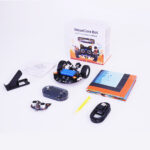
- WeeeCore Controller
- Chassis Expansion Board
- Ultrasonic Sensor
- Type C USB Cable
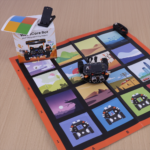
- Accessories: Color Pen, Map, WeeeCore Holder
- Quick Start Guide
Key Features
-
Voice Coding:Simple voice command control for beginners.
-
Advanced Programming:Learn with Scratch 3.0 and microPython.
-
IoT Capabilities:Connect and control with cutting-edge IoT integration.
-
Drawing:Bring your artistic visions to life.
Expandable Electronics Interface:Connect more devices via RJ11 and open-source ports.


Curriculum Highlights
- Voice Coding Activities Book:Engage in creative and interactive learning.


Open to Play
-
Voice Coding:
- “Hi, Vivi” or “Hi, Bot”
- Switch lights, brighter, dimmer
- Turn on lights, turn off lights
- Speed 0-5, draw a square, play music, next, previous, smile, laugh, cheer, cry, time, greet, Pi, elephant, OK.
- Go forward x steps, turn left x steps, turn right x steps, go backward x steps
Line Following Mode (Quad Line-tracking Sensor)
Engage the line tracking functionality. After wake-up robot and activated by say “line following mode” aftre wake up WeeeCore Bot, put the WeeeCore Bot on the black line of the map , press Button A. WeeeCore Bot will study the value of black line automatically. Then press Button B, WeeeCore Bot will do line-following for 20 seconds.

Frequently Asked Questions
- How do I set up the WeeeCore Bot?
- After receive your WeeeCore Bot, follow the instruction to install WeeeCore AI handle on the chassis board. Turn on the power switch, you should be able to see the main interface display on screen after three light sound. Then you are ready to control WeeeCore Bot by voice coding.
- What age group is the WeeeCore Bot suitable for?
- WeeeCore Bot is suitable for different level users. Early learners can study and practice with voice coding and drawing; For K12 students and advanced users, can learn and practice Scratch 3.0 and microPython.
- What warranty and support options are available?
- We provide one year limited warranty. For details and for any support, please contact by support@weeemake.com.




Reviews
There are no reviews yet.